Kafka Producer
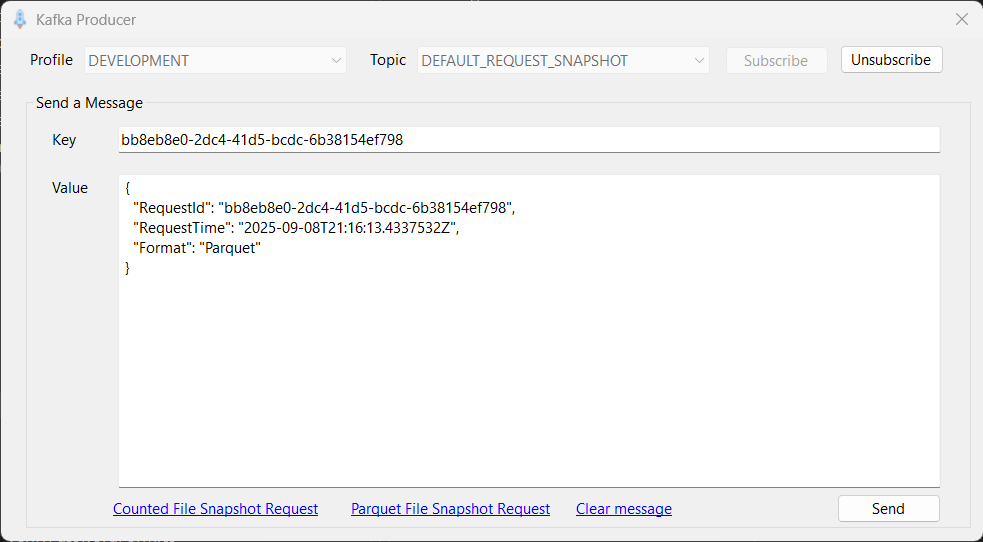
The Kafka Producer utility is a tool that allows you to subscribe to a Kafka topic and send messages to that topic. It runs as a non-modal dialog, so you can start it and then continue to use other LaunchPad functionality. Picking the menu item when the utility is already running will simply switch to the existing running instance of the form.
The Profile picker defaults to the profile that you have selected in the main LaunchPad window, but you can select an alternative profile if desired. Selecting a profile defines which Kafka server you will connect to.
The Topic picker is populated with the three topics defined in the currently selected profile (CDC, snapshot request and snapshot response), allowing you to select the topic that you wish to send messages to.
Having selected a topic, click the Subscribe button to subscribe to the topic.
Having subscribed you can enter or paste the message that you wish to send. Messages can have a 'key' and a 'value', both of which are optional. Which are required depends on the application that will be receiving and processing the message.
A common use case for this utility is to generate snapshot requests, and in the lower part of the dialog you will see hyperlinks that generate appropriate snapshot request messages for either a counted file snapshot (used with the ISAM Agent) or parquet file snapshot (used with the SQL Agent). Clicking one of these links fills in appropriate message data in the key and value fields.
Once you are happy with the content of the message, press the Send button.
When you are done sending messages, press the Unsubscribe button.