Employee File I/O
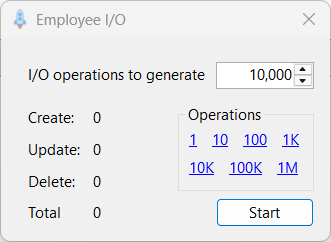
The Employee File I/O utility is a tool that allows you to perform random create, update and delete operations to the test environments EMPLOYEE.ISM data file. It runs as a non-modal dialog, so you can start it and then continue to use other LaunchPad functionality. Picking the menu item when the utility is already running will simply switch to the existing running instance of the form.
Use the I/O operations to generate field to specify the number of operations to perform, or use one of the hyperlinks to populate the field with one of the pre-defined values.
Clicking the Start button will begin generating I/O to the EMPLOYEE.ISM data file. The utility randomly selects between create, update and delete operations, and displays the number of operations completed in each category, as well as the total number of messages that have been sent.
Because the I/O hooks are in play when this utility is used, a common use case is to generate data file activity to test data replication operations. Note that because the I/O hooks are active, using this utility requires the message broker to be running so that CDC messages are send to the Kafka CDC topic. When you launch this utility. LaunchPad will check if the message broker is running and warn you if it is not.
If required, you can use the Kafka Consumer utility to visualize the messages that have been sent.